GithubのプロジェクトをCruiseControlで自動ビルドしてみた
達人プログラマー―ソフトウェア開発に不可欠な基礎知識 バージョン管理/ユニットテスト/自動化 に触発されて、Javaプロジェクトの自動テストにチャレンジしました。
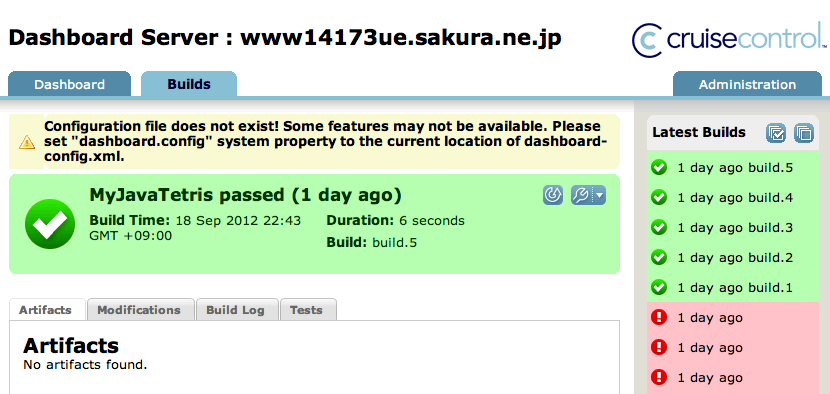
継続的インテグレーションツールであるCruisecontrol(以下CC)を使って、 GitHub上のプロジェクトを自動ビルドしてみます。
今回の環境は、マシンをUbuntu 10.04.4 LTS, CCをcruisecontrol-bin-2.8.4.zip、ビルドターゲットを僕の作ったMyJavaTetrisとします。
目標はソフトウェア開発に役立てるというよりもCCを回すことであるので、手段と目的が逆になっている気もしますがこれも勉強の一つです。
ちなみに上の画像は、CCのdashboardで実際に表示されるページのスクリーンショットです。
本書の手順にあるスクリプトの情報は古く動作しなかったため、公式HPのGettingStartedを参考にしました。
CCのインストール
wget http://jaist.dl.sourceforge.net/project/cruisecontrol/CruiseControl/2.8.4/cruisecontrol-bin-2.8.4.zip
unzip cruisecontrol-bin-2.8.4.zip
mv cruisecontrol-bin-2.8.4 /opt/cruisecontrol/
echo “export PATH=$PATH:/opt/cruisecontrol” >> ~/.bashrcsource ~/.bashrc
Githubプロジェクトの設定
cd /work/ccmkdir projects artifacts logs
<cruisecontrol>
  <project name="MyJavaTetris" buildafterfailed="true">
    <listeners>
      <currentbuildstatuslistener
        file="logs/MyJavaTetris/status.txt"/>
    </listeners>

    <!-- Bootstrappers are run every time the build runs,
                                                 *before* the modification checks -->
    <bootstrappers>
    </bootstrappers>

    <!-- Defines where CruiseControl looks for changes, to decide
                            whether to run the build -->
    <modificationset quietperiod="10">
      <cvs localworkingcopy="projects/MyJavaTetris"/>
    </modificationset>

    <!-- Configures the actual build loop, how often and which
                                  build file/target -->
    <schedule interval="60">
      <ant buildfile="build-MyJavaTetris.xml"
        uselogger="true"/>
    </schedule>

    <!-- directory to write build logs to -->
    <log/>

    <!-- Publishers are run *after* a build completes -->
    <publishers>
    </publishers>
  </project>
</cruisecontrol>
<?xml version="1.0" encoding="UTF-8" standalone="no"?>
<project name="build-MyJavaTetris" default="build" basedir="projects">
  <target name="build">
    <macrodef name = "git">
      <attribute name = "command" />
      <attribute name = "dir" default = "" />
      <element name = "args" optional = "true" />
      <sequential>
        <echo message = "git @{command}" />
        <exec executable = "git" dir = "@{dir}">
          <arg value = "@{command}" />
          <args/>
        </exec>
      </sequential>
    </macrodef>

    <delete dir="MyJavaTetris" />
    <git command ="clone">
      <args>
        <arg value ="ssh://[email protected]:22/yysaki/MyJavaTetris.git"/>
      </args>
    </git>
    <ant antfile="build.xml" dir="MyJavaTetris" target="build" />
    <!-- nazo no error <ant antfile="build.xml" dir="MyJavaTetris" target="test" /> -->
  </target>
</project>
これで設定は全て完了です。
/work/cc/下でcruisecontrol.shを実行するとMyJavaTetrisの自動ビルドが行われます。
後はずっと放置しておけばCCさんが必要なタイミングでプロジェクトの自動ビルドを行います。
リポジトリにコミットした時などにhttp://localhost:8080/にアクセスして動作をニヤニヤ監視しましょう。
以上です。